

The step-by-step kit and class, with Stu Jordan
Finally, Your Own Executive Assistant
It already knows your business, so you just say what you want. It gets it done and brings it back to you before anything goes out.
Get instant access $199 USDWorks in ChatGPT or Claude and connects to your email and calendar. One payment, and your agent is yours forever.
2 x agents built. I did one in codex and one using Claude code. … Very easy to set up mate.
Meet Pea, in 45 seconds
The intro, in words. You carry the whole business in your head. Then a pea pod pops open and Pea says hello: P for personal, E for executive, A for assistant. It already knows your business, so you just talk: draft the follow-up to Sarah, prep me for tomorrow, and quote Mia for the three-month package. It goes and gets it done, working from today's call notes, your calendar and your price list. Then it comes back to you with the follow-up to Sarah ready, and you hit send. You tell it once that proposals to warm leads open with the call, it says it will from now on, and the next morning, in a new chat, Leo's proposal already does. What it knows about you lives in a folder you own, and it works in ChatGPT or Claude. Easy peasy: your own personal executive assistant, set up step by step with me. Call it whatever you like.
 I'm Stu Jordan, founder of AgentGuru, and I build agents that work.
What's in it for you
More Gets Done, And Less Lives In Your Head
You can use AI all day and still be the bottleneck in your business. Once an agent knows the business, the work stops waiting on you.
- Follow-up to SarahReady for you
- Quote for Mia, three-month packageReady for you
- Prep for Tom at 9Ready for you
- Nudge on invoice 1043Ready for you
- Newsletter, from your voice notesReady for you
More done than one person can do
Several jobs move at once while you get on with your day.
A calmer head
It keeps track of your clients and everything in progress. Ask it where things are at.
You're back in charge of your day
It takes on the drafting, prep and chasing, and you decide what goes out.
It keeps what you teach it
Correct it once and it sticks, in a folder you own that works in ChatGPT or Claude.
I could just go and bang, get that sent out. Cool, right?
Stu, in the class, with his agent's draft waiting in Outlook
It's so easy
Tell It What You Want, In Your Own Words
It learns your business once, in the setup, from the material you already have. After that, a sentence or two is enough, typed or said out loud. It's fun, too: you give it a name and a personality, and talk to it like someone on your team.
-
1
"A new enquiry just came in. Draft a warm reply before they go cold."
You say what you want
A sentence or two, the way you'd brief someone who already knows the business.
-
2
Reading the enquiry Checking your price list Writing it in your voice
It goes and gets it done
It reads what it needs, from your inbox to your price list, and writes the way you do.
-
3
Ready for you
Hi Priya, thanks for getting in touch about the workshop. Here's how it runs and what it costs…
SendIt comes back to you
The reply waits in your drafts. Change what you like, then hit send.
Connect your tools by asking
Ask it to connect your email or calendar, and it sets it up with you. It reads only the accounts you connect, and leaves what it writes in your drafts.
Run the inbox brief. What came in overnight that needs me?
- PriyaWorkshop enquiryReply drafted
- Harbour LaneInvoice 1043 questionReply drafted
- TomMoving tomorrow's 9amReply drafted
- LeoSigned, asking what's nextReply drafted
What you give it
Let It Help You Run Your Business
Just give it the stuff, the way you'd say it to an assistant. Each of these comes with a full brief in the kit, ready to go.
A typical week
Just got off a call with Sarah at Harbour Lane. The notes are in the folder. Draft the follow-up while it's fresh.
Write my morning note. What needs me today, and what can wait?
I'm meeting Tom at 9 tomorrow. What did we agree last time, and what do I need to decide?
Invoice 1043 is two weeks late. Draft a friendly nudge that keeps things warm.
My onboarding lives in my head. Turn these messy notes into a numbered process.
Draft this week's newsletter from the voice notes in the folder.
We signed Leo today. Draft his welcome email and set out what happens next.
Summarise this 40-page contract and tell me what I should check.
It's Friday. Write the handover so Monday starts clean.
Clients and sales
Just got off a call with Sarah at Harbour Lane. The notes are in the folder. Draft the follow-up while it's fresh.
I'm meeting Tom at 9 tomorrow. What did we agree last time, and what do I need to decide?
Turn today's call notes into a proposal at our usual rates, and flag anything you're unsure of.
Quote Mia for the three-month package from our price list.
A new enquiry came in overnight. Draft a warm reply before they go cold.
I'm pitching a bigger client on Thursday. What will they push back on, and how do I answer it?
Invoice 1043 is two weeks late. Draft a friendly nudge that keeps things warm.
We signed Leo today. Draft his welcome email and set out what happens next.
Write this week's status update for the Harbour Lane project.
Content
I ran two workshops this week. Turn the best moment into a post in my voice.
Draft this week's newsletter from the voice notes in the folder.
Our About page sounds like a template. Rewrite it so it sounds like me.
Turn the Harbour Lane results into a short case study I can send to prospects.
Research next week's topic from the articles I saved, and tell me what's worth saying.
Customers keep asking the same questions. Build an FAQ from the ones in the folder.
Planning and admin
Write my morning note. What needs me today, and what can wait?
Plan my week from the list in the folder, biggest wins first.
It's Friday. Write the handover so Monday starts clean.
My onboarding lives in my head. Turn these messy notes into a numbered process.
Summarise this 40-page contract and tell me what I should check.
I'm deciding whether to hire or outsource. Think it through with me.
Sort what I saved this week and tell me what matters.
Run the monthly review. What worked, and what should we drop?
Once your tools are connected
Run the inbox brief. What came in overnight that needs me?
Debrief today's calls and list what I promised people.
Do my numbers. How did yesterday compare with last week?
What did the ads do this week, and what would you change?
Prep me for tomorrow from my calendar.
Keep an eye on the market and tell me what changed since last time.
What I mean by a business agent
It Turns Your ChatGPT Or Claude Into A Personal Agent You Own
You keep the ChatGPT or Claude you already pay for. Your agent is a layer on top of it that knows your business, and that layer belongs to you.
So you just work in a chat, specify your agent folder, and life gets so much easier.
Stu, in the class
You can switch apps
The same agent works in ChatGPT and in Claude, so you can move between them whenever you like.
It uses every new model
When a smarter model comes out, your agent can use it straight away, with everything it already knows about you.
Behind it is one folder on your computer, holding what your agent knows about you: who you are, what you sell, how you write and the rules it works to. It reads that folder every time a chat opens. Your agent writes it for you from the material you already have, so it only asks you about what's missing.
- Its startup instructionsWhat it reads before anything else
AGENTS.md - What it's forAnd what it never does
purpose.md - Your businessWhat you sell and who you sell it to
business.md - Your offersYour prices and packages
offers.md - How you writeSo drafts sound like you
voice.md - The rulesWhat it can do on its own, and what it checks with you first
rules.md - Job briefsOne for each job you hand it
job-briefs - Your materialFor the interviews to read
context - MemorySets itself up when you paste one line, then keeps what you teach it
What it feels like
You Open A Chat And It's Already Up To Speed
Last week's work and your prices are in the folder, so when you say good morning, it knows what's on.
The closest thing I can compare it to is an executive assistant that knows your world and is there at your beck and call. You give it a name and a personality when you set it up.
The agent kit and the full class, $199 USD
Get instant accessWhat changes
This Is The Promise Of AI Agents
An agent is AI that knows your world. Every time you start a fresh chat it knows your business and what you're working on, and it remembers what you've been doing over the last weeks and months.

You just don't have to carry all this stuff in your head.
Stu, in the class
Now
- A fresh chat, and you hope it remembers the right things.
- Your offers and your notes, pasted in again.
- Last week's work is buried somewhere in your chat history.
- Making last month's correction all over again.
- One job at a time, and you wait on every answer.
- What it remembers about you is chosen by the platform and stays inside it.
With an agent
- It opens every chat already knowing your business and how you write.
- Hand it the prep for tomorrow's sessions, or the proposal you promised on this morning's call, and get on with something else.
- Last week's work is in the folder, where you can both find it.
- When you correct it, it keeps the correction.
- Hand one chat a job, then open another and give it the next while the first keeps going.
- It writes the email and tells you when it's ready, and then you check it and hit send.
Easy peasy
It's So Much Easier Than People Realise
If you've only ever used ChatGPT or Claude in the browser, the desktop app is where this happens.
- 1
Get the desktop app
Download the Claude or ChatGPT desktop app. The app is free to download. You'll need a paid plan, and ChatGPT Plus or Claude Pro is enough to start.
- 2
Make a folder and open it
Make an empty folder on your computer and open it in the app. In ChatGPT you open it in Codex, and in Claude in the Code tab or Cowork, all part of the app you just downloaded. From then on, the only thing you do differently is start your chats with the folder selected.
- 3
Paste one line
Copy the first line from the kit and paste it into the chat, and your agent brings its own files into the folder.
- 4
Add your material, then answer its questions
Drop copies of your offers into the folder, with a few proposals and emails you were happy with. It reads them first, then interviews you about what's missing and writes its own files. Most questions are a quick check, like "Your price list says a strategy day is $1,500. Still right?"
So, paint by numbers, but the agent does the painting, you just do the answering.
Stu, in the class
If you've built up a lot in ChatGPT or Claude, two more lines bring what it knows about you, and your best chats, into your agent's folder.
ChatGPT. Open the ChatGPT desktop app. Go to Codex (or Work), choose New project, then Add a folder on this computer, and pick your agent's folder. It reads AGENTS.md by itself. Start a new chat.
Step 2 done
Good morning, Buzz. Can you tell me who you are and how you help me by running your startup files and sort of showing me where we're at?
Worked for 47s
Good morning, Stu. I'm Buzz, your business agent. I prepare drafts, research and call prep, work on agent architecture with you, and keep you pointed at revenue. You decide what goes out.
The guide is awesome. This is what I have needed to really make headway. Halfway through the interviews.
The agent kit and the full class, $199 USD
Get instant accessThe guardrails
It Drafts, And You Send

Nothing goes out with your name on it until you've seen it, and it won't spend money or delete anything.
Its rules say instructions come only from you and the files in its folder. Anything it reads, like an email or a web page, is treated as information.
The rules are in a file it reads every time it starts, like a company policy for a new hire. You can change any of them with one sentence in the chat.
I'm the human in the loop at the end.
Stu, in the class
Why it matters that it's yours
This Is Your Agent, And You Own It
Your agent's memory, and everything you've taught it, belongs to you.

Every week you work with it, that folder holds more of your business, including every correction you've made. It's on your own computer, so it comes with you to a new laptop or a new app.
You pay for it once, and it's yours forever.
I bang on about this in the class because you'll see the value six months from now even more than you see it today.
I think that is the most critical thing, is that you own it, and you can shift it. You can take it from one computer to another. You have control over your agent and everything it knows.
Stu, in the class
Who's teaching
I'm Stu Jordan, And I Run My Own Business This Way

I'm not a developer and I don't write code, so everything you'll watch me do happens in the Claude and ChatGPT apps you already know. In February 2023 I went all in on AI without knowing what shape it would take.
Agents hooked me early on. Since March 2023 I've taught what I was learning in live sessions for a community that grew to 65,000 people.
My own agent, Jett, has worked alongside me since February 2026. By now, it knows the business, remembers things I've forgotten and has witnessed enough abandoned projects to know where all the bodies are buried. What you build in the class keeps what you teach it, the same way mine has.
From people who learn with me
Stu has transformed how I think about AI, how I use it (on a daily basis), how I build with it … and most valuable for me, instilled a confidence in me that a year ago was inconceivable. He is an incredible teacher and he imparts his vast knowledge in ways that make it easy for everyone to understand.
Your attention to security risks that most people miss is gold. As a non-tech marketing professional, I know you think steps ahead, which gives me an extra layer of trust in what you teach.
I know who knows what they're doing and who doesn't, and you know what you're doing more than anyone else.
Hear it from me
Nine Minutes With Me, And My Own Agent
It's nine minutes, filmed in the ChatGPT desktop app. About two minutes in, you'll see the agent I work with every day open a fresh chat already knowing what we were working on, without me explaining a thing.
"I cannot remember the last time I had to go hunt through old chats."
I filmed this before the live class on 17 September. The kit and the recording are ready for you now.
The kit
Paste One Line, And It Sets Itself Up
Everything starts with one line from the kit. Paste it into a chat, and your agent sets itself up in your folder, then gets to know your business.
- 1
Paste one line
Copy it from the kit into a chat in your agent's folder.
- 2
It installs itself
Your agent brings its own files into the folder and sets up its memory.
- 3
Then it interviews you
It reads the material you drop in, then asks you about whatever's missing.
- 4
You say what you want
In your own words, typed or said out loud, and it gets it done.
- 5
Week by week, it learns you
Every correction sticks, so it works more and more the way you like.
You're in control the whole way
It works the way you tell it to. Say what you like and what you don't, and it changes how it works from then on. Open any of its files and you can see exactly what it knows.
Every Step, On One Page
It's in the order you'll do it. Pick the app you use at the top and every line switches to match it, each with a copy button.
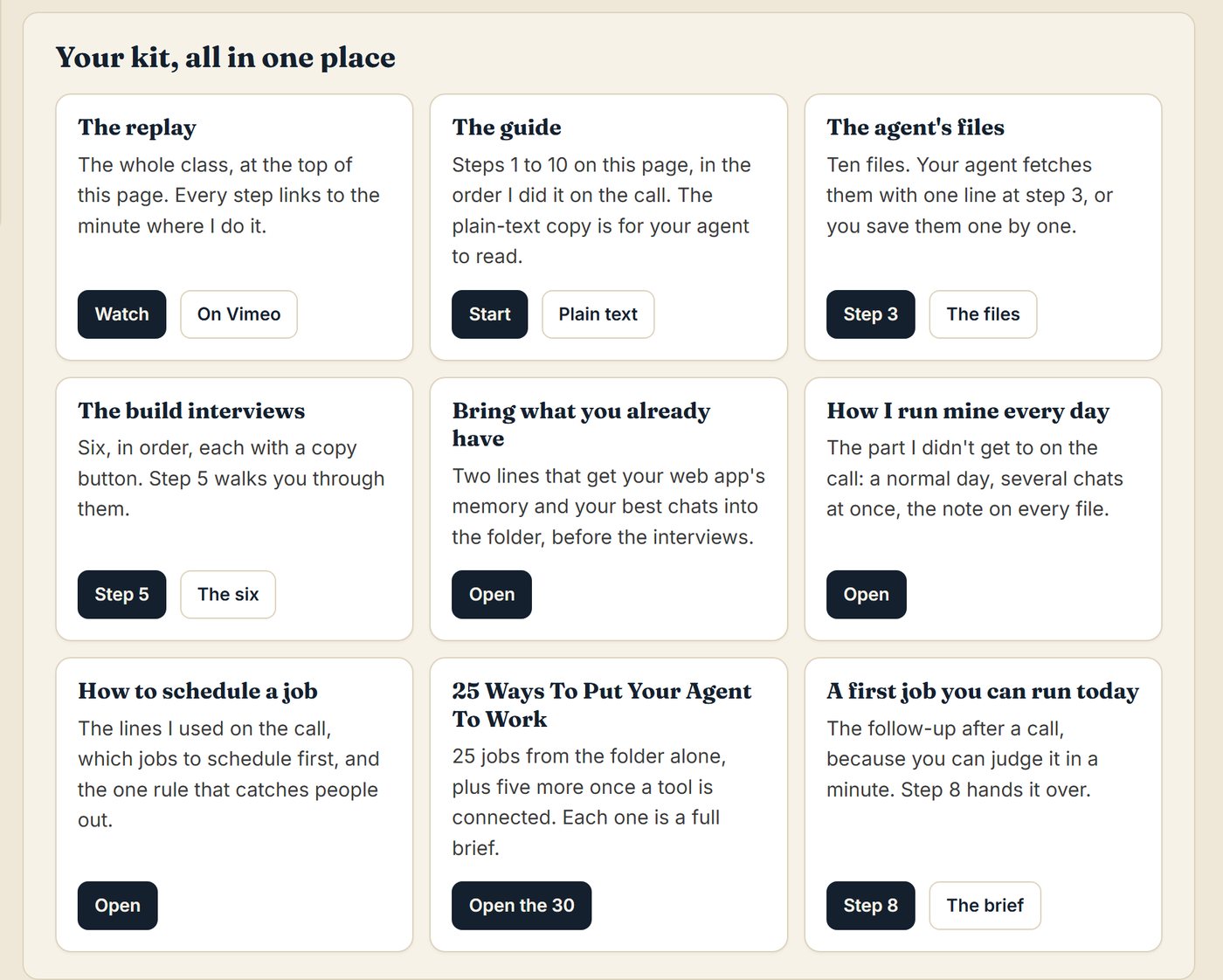
The class, as your walkthrough
Watch Me Build One From An Empty Folder
The full class comes with the kit, so you can watch me do every step. I taught it live on Zoom with no slides, building an agent from an empty folder while business owners watched and asked their questions.

Then I said "let's put this to the test" and handed it some work. I connected Outlook just by asking, and the email it wrote went to my drafts for me to check and send.
It runs just over two hours, and every step on your setup page links to the minute I do it, so you only watch the bits you need.
If you can do it, it can do it. That's the golden rule, basically.
Stu, in the class
What's in the recording, minute by minute
- 16:41Make the folderWhere your agent lives
- 17:41The agent's files go inOn the recording I copy them across. The kit now does it with one line you paste
- 19:22Pick your appClaude or ChatGPT, and why I use the one I do
- 23:22Your material goes inWhat to bring and what to keep out
- 32:12The six build interviewsOne interview for each file
- 54:46The startup file and the first testA fresh chat that already knows you
- 1:00:39MemorySet up with one line you paste
- 1:09:28It asks before it touches your filesOnce memory was in, it spotted an out-of-date line in the startup file and told me: "That's your file, so I won't touch it without your say-so."
- 1:13:35A daily research brief, set up by voiceIt researched live, then set the brief up to run every day
- 1:20:49Connecting your tools by askingOutlook, and the email that went to my drafts
- 1:30:11The same agent, opened in ChatGPTClaude kept working in one window while ChatGPT answered as the same agent in the other
- 1:40:19A rule that said noIt turned down two jobs under its own rules and explained why, and I widened the rule with one sentence
- 1:43:00The room's questionsTeams, two businesses, safety, which model
- 2:05:55Back it up and take it with youYour agent is a folder you own
Bonus
25 Ways To Put Your Agent To Work
From day one you'll know what to hand it. Each of the 25 is a full brief you give straight to your agent.
Eight of the 25
- A morning note on where everything is at, and what to start on first
- Meeting prep: what was said last time and what you'll have to decide
- The follow-up email, drafted while the call is fresh
- A full proposal the same day, from your own prices
- A warm reply to a new lead while they're still interested
- This week's newsletter, teaching one thing
- The welcome email for a new client, setting out what happens next
- The Friday handover, so you know on Monday what's still open
Plus 17 more, and another 5 for when you've connected a tool.
One of them, the follow-up after a call
The next thing starts the moment the call ends, and at 6pm the follow-up you meant to write is still owed. This drafts it while the notes are fresh, so all you do is read it and send it.
Boundaries. Never invent a fact, price, date or result. Services and promised outcomes count too. If the notes and offers.md disagree, show me both and let me pick. If the notes are missing something the email needs, ask, or leave a clearly marked gap. One email, one next step. You draft, I send.
Read the whole brief
The job. Draft the follow-up email after a client or prospect conversation.
When. On request, straight after the call, while the notes are fresh.
What to use. The five agent files, as always. The call notes I paste into the chat, or a file I point you at. Memory, and anything in the folder about this client. If my email or calendar is connected, read from there; otherwise I'll paste it or point you at a file.
What to return. One file, named with today's date and the job, containing: the note at the top (what you did, what you assumed, what you couldn't find, what needs me); a subject line; the email, where the first 2 lines show you understood their situation, then the next step, using the offer and price from offers.md that fits, in my voice and my formatting; and under the email, any question you'd have asked me if you'd been in the room.
The handover line. "Just got off the phone with [client], the notes are in the folder, write the follow-up."
The agent kit and the full class, $199 USD
Get instant accessNeeds the Claude or ChatGPT desktop app on a paid plan. ChatGPT Plus or Claude Pro is enough. All sales are final. If you get stuck on a step, reply to your delivery email and tell me which one, and you'll hear back.
Who it's for
Made For Business Owners Who Already Use AI Every Day
This is for you if
- You run a business, a practice, a consultancy or an agency, and you use ChatGPT or Claude most days.
- You use ChatGPT or Claude in the browser today. This is the ideal starting agent for you.
- You're tired of explaining yourself to AI and want it to know your world.
- You want to hand work over by telling it what you want, in your own words.
- You want an agent that's yours, in files you can take with you.
Not yet, if
- You haven't used ChatGPT or Claude at all. Start there, then come back.
- You want it to send emails or spend money without you.
- You want one agent for your whole team to share.
- You'd rather not sit down and answer its questions about your business.
Get started
Everything You Need To Build Yours
You already pay for ChatGPT or Claude, and you know your business better than anyone. The kit turns that subscription into a personal agent that knows it too, then shows you how I use mine every day.

Build Your First Business Agent
The agent kit, with the full class as your walkthrough
One payment, and your agent is yours forever. You get everything straight away.
Get instant accessWhen you've paid, you go straight to your kit, and the link comes by email too.
- The agent's files, brought into your folder when you paste one line
- Six build interviews that write the files for you
- Memory that keeps what you teach it
- Bring what you already have: what ChatGPT or Claude knows about you, and your best chats
- The step-by-step setup page, with every step linked to its minute
- The full class recording, your walkthrough, which plays on your phone too
- How I run mine every day, and what the app will ask you
- BONUS: 25 Ways To Put Your Agent To Work, plus 5 more
What you need
The Claude or ChatGPT desktop app on a paid plan, on Windows or a Mac. ChatGPT Plus or Claude Pro is enough to start. On Claude's Code tab and in ChatGPT, the memory also uses a free program called Python, and your agent can usually install it for you.
If you get stuck, ask your agent first, because it knows its way around the app. If you're still stuck, reply to your delivery email and tell me which step, and you'll hear back.
All sales are final. If anything in the kit won't open or doesn't work the way this page says, reply to your delivery email and I'll put it right.
Questions
The Questions I Get Most
One last thing
A New Way To Work With AI, Without The Overwhelm
I just want one agent across the board that makes my life easy, because that's what AI promised us. An agent that knows your business takes some of the weight off you, so you can spend your day on the things you're good at.
And you don't have to do it all on day one. This agent will be here today, tomorrow, next week, the day after.
Get instant access $199 USDAfter about two or three weeks of adjustment, you'll wonder how you ever did without it, I assure you. It just gives you so much more. Calmness in the mind.
Stu, in the class
Paste one line today, and your agent sets itself up. It needs the Claude or ChatGPT desktop app on a paid plan. All sales are final.
P.S. If you skim to the bottom the way I do, it's the agent kit and the full class for $199 USD, and you can start today. Here's what I told the room: "if I can run these things, anybody can."
If you're not ready yet, my free newsletter is where I share what I'm building with agents and how you can use it in your own business.